
Icecream PDF Editor3.19 - Download
You'll be able to download in few seconds.
Publisher Description
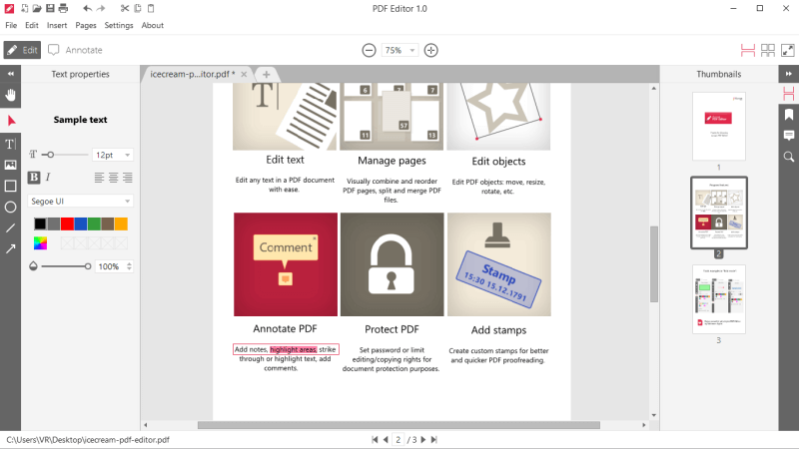
Icecream PDF Editor is a all-in-one software to edit PDF that offers a whole range of features and options to edit PDF documents. Edit text of the opened PDF documents and add new text (select text font and size), add stamps (custom stamps and preset ones). Annotated PDF and add various graphic objects such as lines, arrows, circles, rectangles and freehand. Strikeout and underline text. Add blank pages to the PDF files and edit PDF files' permissions. Edit PDF metadata and add images. All these features and the additional other ones are accessible through intuitive user-friendly GUI.
About Icecream PDF Editor
This Office Suites & Tools program is available in English, Arabic, Chinese, ChineseSimplified, Dutch, French, German, Italian, Portuguese, Russian, Spanish, Thai, Turkish. It was last updated on 29 September, 2026. Icecream PDF Editor is compatible with the following operating systems: Windows.
The company that develops Icecream PDF Editor is Icecream Apps. The latest version released by its developer is 3.19.
The download we have available for Icecream PDF Editor has a file size of 22.0 MB. Just click the green Download button above to start the downloading process. The program is listed on our website since 2024-01-11 and was downloaded 0 times. We have already checked if the download link is safe, however for your own protection we recommend that you scan the downloaded software with your antivirus. Your antivirus may detect the Icecream PDF Editor as malware if the download link is broken.
How to install Icecream PDF Editor on your Windows device:
- Click on the Download button on our website. This will start the download from the website of the developer.
- Once the Icecream PDF Editor is downloaded click on it to start the setup process (assuming you are on a desktop computer).
- When the installation is finished you should be able to see and run the program.
Program Details
General
System requirements
Download information
Pricing
Version History
version 3.19
posted on 2024-01-11
Print annotations customization.
version 3.16
posted on 2023-11-30
Filling PDF form fixes and improvements.
version 3.15
posted on 2023-11-16
PDF Editor added to 'Open with..' context menu.
version 3.12
posted on 2023-10-31
Crop PDF crash fix;
Text markup for annotations bug fix;
PRO activation fix.
version 2.71
posted on 2023-04-14
'Holes in documents' bug fixed.
version 2.70
posted on 2023-03-22
- Copy/cut/paste objects between open documents;
- Copy/cut/paste pages between open documents;
- Append files right from navigation panel;
- 'Long text' fix for stamps;
- 'Undo' major fixes and potential crash fixes;
- Other potential crash fixes;
- Multiple UX improvements.
version 2.62
posted on 2022-07-05
- Crash fixes;
- Update Page remove bug fixed.
version 2.57
posted on 2022-03-29
- Clear recent files function added;
- Double-click to select whole words in 'Annotate' mode;
- Multiple minor fixes.
version 2.56
posted on 2021-12-27
- Append PDF files by drag&dropping them into navigator bar or in Manage Pages mode;
- Append multiple PDF files at once in Manage Pages mode;
- Multiple bugs associated with deleting pages fixed.
version 2.53
posted on 2021-10-20
- Quickly delete pages with Del button;
- Typewriter annotations fix;
- Pen change crash fix;
- Minor GUI fixes
Disclaimer
External Download
We do not host Icecream PDF Editor on our servers. We did not scan it for viruses, adware, spyware or other type of malware. This app is hosted by the software publisher and passed their terms and conditions to be listed there. We recommend caution when installing it.
The external download link for Icecream PDF Editor is provided to you by apps112.com without any warranties, representations or guarantees of any kind, so access it at your own risk.
If you have questions regarding this particular app contact the publisher directly. For questions about the functionalities of apps112.com contact us.
